2026. 6. 5. 22:58ㆍAI/LLM
멀티 모달을 활용하는 개발 경험에서 음성 비서 앱도 추가할 수 있다.
특히 다음과 같은 기능을 제공할 수 있다.

음성을 텍스트로 변환하고, 그것을 기준으로 질문 처리하여, 그것을 또 음성으로 변환하는 기능을 수행한다.
구체적인 단계는 다음과 같다.


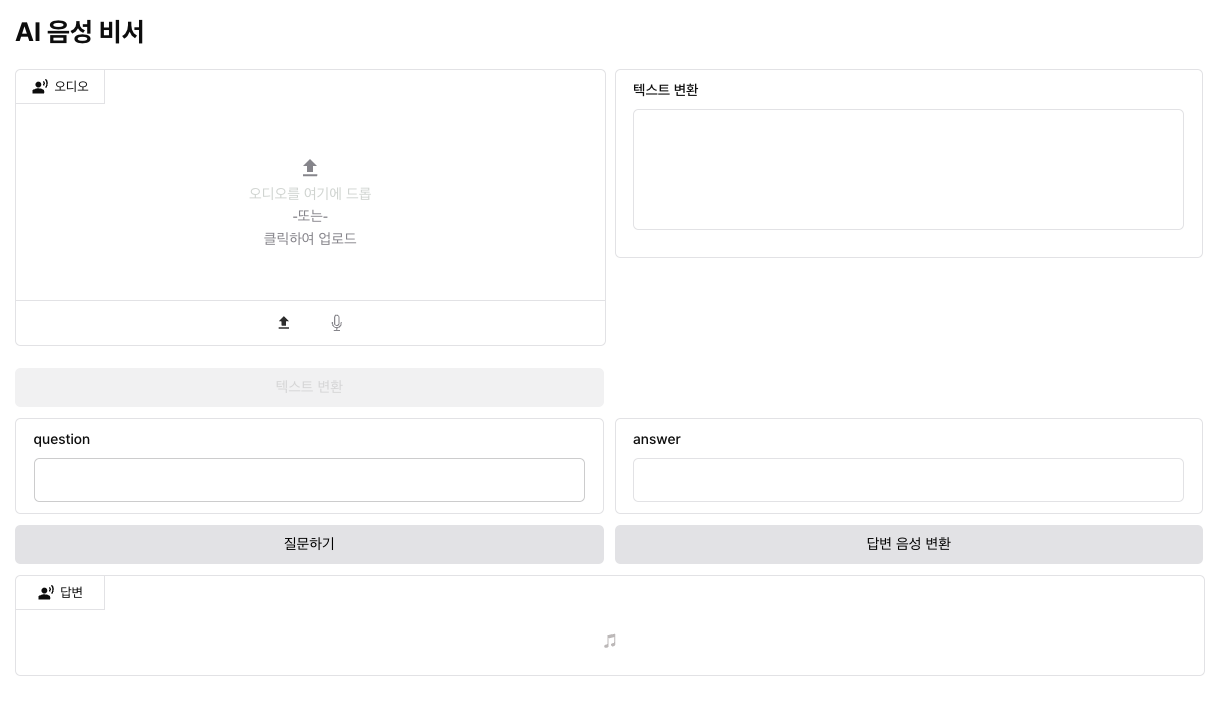
먼저 화면 구성 먼저 진행해보자.
1단계 : 화면 구성
사용된 Next.js는 다음과 같다.
app/sound_assistant/page.tsx
import AudioComponent from "@/components/AudioComponent";
import AudioResponse from "@/components/AudioResponse";
import CommonPut from "@/components/CommonPut";

export default function SoundAssistantPage() {
    return (
        <main>
            <div id="wrap" className="w-[1080px] mx-auto">
                <h2 className="mt-[30px] mb-[20px]">AI 음성 비서</h2>
                <div id="gra__block" className="grid grid-cols-2 gap-[10px]">
                    <AudioComponent />
                    <CommonPut put={"output"} label={"텍스트 변환"} height={110} highHeight={150} />
                    <CommonPut put={"input"} label={"question"} height={40} hasButton={"질문하기"} />
                    <CommonPut put={"input"} label={"answer"} height={40} hasButton={"답변하기"} />
                </div>
                <div className="mt-[10px]">
                    <AudioResponse />
                </div>
            </div>
        </main>
    )
}
src/components/AudioComponent.tsx
'use client';

import { useState, useRef } from "react";
import { MdSpatialAudioOff, MdUpload } from "react-icons/md";
import { HiOutlineMicrophone } from "react-icons/hi2";
import { IoCloseCircle } from "react-icons/io5";
import { MdPlayArrow, MdPause } from "react-icons/md";
import { MdSkipPrevious, MdSkipNext } from "react-icons/md";

export default function AudioComponent() {
    const [activeTab, setActiveTab] = useState<'upload' | 'record'>('upload');
    const [uploadedAudio, setUploadedAudio] = useState<string>("");
    const [isUploading, setIsUploading] = useState(false);
    const [isPlaying, setIsPlaying] = useState(false);
    const [duration, setDuration] = useState(0);
    const [currentTime, setCurrentTime] = useState(0);
    const inputRef = useRef<HTMLInputElement | null>(null);
    const audioRef = useRef<HTMLAudioElement | null>(null);

    const handleAudioUpload = () => {
        inputRef.current?.click();
    };

    const handleFileChange = async (e: React.ChangeEvent<HTMLInputElement>) => {
        const file = e.target.files?.[0];
        if (!file) return;

        try {
            setIsUploading(true);
            const formData = new FormData();
            formData.append("file", file);
            const response = await fetch("http://localhost:8000/api/v1/file-upload", {
                method: "POST",
                body: formData,
            });
            const data = await response.json();
            setUploadedAudio(data.url);
        } catch (error) {
            console.error("Upload failed:", error);
        } finally {
            setIsUploading(false);
        }
    };

    const clearAudio = () => {
        setUploadedAudio("");
        setIsPlaying(false);
        setCurrentTime(0);
        if (inputRef.current) inputRef.current.value = "";
    };

    const handlePlayPause = () => {
        if (audioRef.current) {
            if (isPlaying) {
                audioRef.current.pause();
            } else {
                audioRef.current.play();
            }
            setIsPlaying(!isPlaying);
        }
    };

    const handleTimeUpdate = () => {
        if (audioRef.current) {
            setCurrentTime(audioRef.current.currentTime);
        }
    };

    const handleLoadedMetadata = () => {
        if (audioRef.current) {
            setDuration(audioRef.current.duration);
        }
    };

    const handleProgressChange = (e: React.ChangeEvent<HTMLInputElement>) => {
        const newTime = parseFloat(e.target.value);
        setCurrentTime(newTime);
        if (audioRef.current) {
            audioRef.current.currentTime = newTime;
        }
    };

    const formatTime = (time: number) => {
        if (isNaN(time)) return "0:00";
        const minutes = Math.floor(time / 60);
        const seconds = Math.floor(time % 60);
        return `${minutes}:${seconds.toString().padStart(2, "0")}`;
    };

    return (
        <div id="audioWrap">
            <div id="audioWrapBox" className="w-full h-[250px] border border-[#e6e6e8] rounded-[5px] flex flex-col">
                <div id="audioWrapBoxTitle" className="w-[80px] h-[30px] border-r border-b border-[#e6e6e8] flex items-center justify-center gap-[5px]">
                    <MdSpatialAudioOff />
                    <span className="text-[12px]">오디오</span>
                </div>
                <div id="audioWrapBoxContent" className="flex-1 flex flex-col justify-center items-center gap-[12px]">
                    {activeTab === 'upload' ? (
                        <>
                            {uploadedAudio ? (
                                <div className="w-[280px] flex flex-col items-center gap-[12px]">
                                    {/* 음파 시각화 */}
                                    <div className="w-full h-[40px] flex items-center justify-center gap-[2px] mb-[4px]">
                                        {[...Array(40)].map((_, i) => (
                                            <div
                                                key={i}
                                                className="w-[1.5px] bg-[#999] rounded-full"
                                                style={{
                                                    height: `${20 + Math.sin(i * 0.5 + currentTime) * 10}px`,
                                                    opacity: i / 40 <= (currentTime / duration) ? 1 : 0.3,
                                                }}
                                            />
                                        ))}
                                    </div>

                                    {/* 플레이어 컨트롤 */}
                                    <div className="w-full flex items-center justify-center gap-[8px] px-[8px]">
                                        <button className="text-[#999] hover:text-[#333] transition-colors">
                                            <MdSkipPrevious size={16} />
                                        </button>
                                        <button
                                            onClick={handlePlayPause}
                                            className="text-[#999] hover:text-[#333] transition-colors"
                                        >
                                            {isPlaying ? <MdPause size={16} /> : <MdPlayArrow size={16} />}
                                        </button>
                                        <button className="text-[#999] hover:text-[#333] transition-colors">
                                            <MdSkipNext size={16} />
                                        </button>
                                        <span className="text-[10px] text-[#999] min-w-[24px]">{formatTime(currentTime)}</span>
                                    </div>

                                    {/* 진행률 바 */}
                                    <input
                                        type="range"
                                        min="0"
                                        max={duration || 0}
                                        value={currentTime}
                                        onChange={handleProgressChange}
                                        className="w-full h-[2px] bg-[#ddd] rounded-full appearance-none cursor-pointer"
                                        style={{
                                            background: `linear-gradient(to right, #999 0%, #999 ${(currentTime / duration) * 100}%, #ddd ${(currentTime / duration) * 100}%, #ddd 100%)`
                                        }}
                                    />

                                    <button
                                        onClick={clearAudio}
                                        className="flex items-center gap-[6px] text-[#919096] hover:text-[#333] transition-colors text-[12px]"
                                    >
                                        <IoCloseCircle size={16} />
                                        <span>제거</span>
                                    </button>

                                    <audio
                                        ref={audioRef}
                                        onTimeUpdate={handleTimeUpdate}
                                        onLoadedMetadata={handleLoadedMetadata}
                                        onEnded={() => setIsPlaying(false)}
                                    >
                                        <source src={uploadedAudio} type="audio/mpeg" />
                                    </audio>
                                </div>
                            ) : (
                                <button
                                    onClick={handleAudioUpload}
                                    disabled={isUploading}
                                    className="flex flex-col justify-center items-center gap-[5px]"
                                >
                                    <MdUpload size={22} color={"#919096"} />
                                    <span className="text-[#d6d9d6]">오디오를 여기에 드롭</span>
                                    <span className="text-[#919096]">-또는-</span>
                                    <span className="text-[#919096]">{isUploading ? "업로드 중..." : "클릭하여 업로드"}</span>
                                </button>
                            )}
                            <input
                                type="file"
                                ref={inputRef}
                                onChange={handleFileChange}
                                accept="audio/mp3,audio/wav,audio/m4a,audio/ogg,audio/flac,.mp3,.wav,.m4a,.ogg,.flac"
                                className="hidden"
                            />
                        </>
                    ) : (
                        <button className="flex flex-col justify-center items-center gap-[5px]">
                            <HiOutlineMicrophone size={22} color={"#919096"} />
                            <span className="text-[#d6d9d6]">녹음 시작</span>
                            <span className="text-[#919096]">클릭하여 녹음</span>
                        </button>
                    )}
                </div>
                <div id="audioWrapBoxTab" className="h-[40px] border-t border-[#e6e6e8] flex justify-center items-center gap-[20px] px-[20px]">
                    <button
                        onClick={() => setActiveTab('upload')}
                        className={`flex items-center gap-[6px] transition-colors ${activeTab === 'upload'
                            ? 'text-[#333]'
                            : 'text-[#919096]'
                            }`}
                    >
                        <MdUpload size={16} />
                    </button>
                    <button
                        onClick={() => setActiveTab('record')}
                        className={`flex items-center gap-[6px] transition-colors ${activeTab === 'record'
                            ? 'text-[#333]'
                            : 'text-[#919096]'
                            }`}
                    >
                        <HiOutlineMicrophone size={16} />
                    </button>
                </div>
            </div>
            <button className="w-full py-[10px] bg-[#e4e4e6] rounded-[5px] mt-[20px] disabled:opacity-45" disabled={!uploadedAudio}>텍스트 변환</button>
        </div>
    )
}
src/components/CommonPut.tsx
export default function CommonPut({ put, label, height, highHeight, hasButton }: { put: string, label: string, height: number, highHeight?: number, hasButton?: string }) {
    return (
        <div id="commonPut">
            <div id="commonPutBox" className="border border-[#e6e6e8] rounded-[5px] px-[16px] py-[10px]" style={{ height: highHeight ? `${highHeight}px` : "auto" }}>
                <h2 className="text-[13px] font-[500] mb-[10px]">{label}</h2>
                {put === "output" ? (
                    <div className="text__content w-full border border-[#e6e6e8] box-border rounded-[5px]" style={{ height: `${height}px` }}>

                    </div>
                ) : (
                    <input type="text" className="text__content px-[10px] outline-none w-full h-[112px] border border-[#d2d2d3] box-border rounded-[5px]" style={{ height: `${height}px` }}>

                    </input>
                )}
            </div>
            {hasButton && <button className="w-full py-[10px] px-[14px] bg-[#e6e6e8] text-white rounded-[5px] mt-[10px]">{hasButton}</button>}
        </div>
    )
}
src/components/AudioResponse.tsx
'use client';

import { useState, useRef } from "react";
import { MdSpatialAudioOff } from "react-icons/md";
import { IoCloseCircle } from "react-icons/io5";
import { MdPlayArrow, MdPause } from "react-icons/md";
import { MdSkipPrevious, MdSkipNext } from "react-icons/md";
import { IoIosMusicalNotes } from "react-icons/io";

interface AudioResponseProps {
    audioUrl?: string;
    onClear?: () => void;
}

export default function AudioResponse({ audioUrl, onClear }: AudioResponseProps) {
    const [isPlaying, setIsPlaying] = useState(false);
    const [duration, setDuration] = useState(0);
    const [currentTime, setCurrentTime] = useState(0);
    const audioRef = useRef<HTMLAudioElement | null>(null);

    const handlePlayPause = () => {
        if (audioRef.current) {
            if (isPlaying) {
                audioRef.current.pause();
            } else {
                audioRef.current.play();
            }
            setIsPlaying(!isPlaying);
        }
    };

    const handleTimeUpdate = () => {
        if (audioRef.current) {
            setCurrentTime(audioRef.current.currentTime);
        }
    };

    const handleLoadedMetadata = () => {
        if (audioRef.current) {
            setDuration(audioRef.current.duration);
        }
    };

    const handleProgressChange = (e: React.ChangeEvent<HTMLInputElement>) => {
        const newTime = parseFloat(e.target.value);
        setCurrentTime(newTime);
        if (audioRef.current) {
            audioRef.current.currentTime = newTime;
        }
    };

    const formatTime = (time: number) => {
        if (isNaN(time)) return "0:00";
        const minutes = Math.floor(time / 60);
        const seconds = Math.floor(time % 60);
        return `${minutes}:${seconds.toString().padStart(2, "0")}`;
    };

    const clearAudio = () => {
        setIsPlaying(false);
        setCurrentTime(0);
        onClear?.();
    };

    return (
        <div id="audioResponse">
            <div id="audioResponseBox" className="w-full border border-[#e6e6e8] rounded-[5px] flex flex-col">
                <div id="audioResponseTitle" className="w-[80px] h-[30px] border-r border-b border-[#e6e6e8] flex items-center justify-center gap-[5px]">
                    <MdSpatialAudioOff />
                    <span className="text-[12px]">답변</span>
                </div>
                <div id="audioResponseContent" className="flex-1 flex justify-center items-center p-[20px]">
                    {audioUrl ? (
                        <div className="w-[280px] flex flex-col items-center gap-[12px]">
                            {/* 음파 시각화 */}
                            <div className="w-full h-[40px] flex items-center justify-center gap-[2px] mb-[4px]">
                                {[...Array(40)].map((_, i) => (
                                    <div
                                        key={i}
                                        className="w-[1.5px] bg-[#999] rounded-full"
                                        style={{
                                            height: `${20 + Math.sin(i * 0.5 + currentTime) * 10}px`,
                                            opacity: i / 40 <= (currentTime / duration) ? 1 : 0.3,
                                        }}
                                    />
                                ))}
                            </div>

                            {/* 플레이어 컨트롤 */}
                            <div className="w-full flex items-center justify-center gap-[8px] px-[8px]">
                                <button className="text-[#999] hover:text-[#333] transition-colors">
                                    <MdSkipPrevious size={16} />
                                </button>
                                <button
                                    onClick={handlePlayPause}
                                    className="text-[#999] hover:text-[#333] transition-colors"
                                >
                                    {isPlaying ? <MdPause size={16} /> : <MdPlayArrow size={16} />}
                                </button>
                                <button className="text-[#999] hover:text-[#333] transition-colors">
                                    <MdSkipNext size={16} />
                                </button>
                                <span className="text-[10px] text-[#999] min-w-[24px]">{formatTime(currentTime)}</span>
                            </div>

                            {/* 진행률 바 */}
                            <input
                                type="range"
                                min="0"
                                max={duration || 0}
                                value={currentTime}
                                onChange={handleProgressChange}
                                className="w-full h-[2px] bg-[#ddd] rounded-full appearance-none cursor-pointer"
                                style={{
                                    background: `linear-gradient(to right, #999 0%, #999 ${(currentTime / duration) * 100}%, #ddd ${(currentTime / duration) * 100}%, #ddd 100%)`
                                }}
                            />

                            <button
                                onClick={clearAudio}
                                className="flex items-center gap-[6px] text-[#919096] hover:text-[#333] transition-colors text-[12px]"
                            >
                                <IoCloseCircle size={16} />
                                <span>제거</span>
                            </button>

                            <audio
                                ref={audioRef}
                                onTimeUpdate={handleTimeUpdate}
                                onLoadedMetadata={handleLoadedMetadata}
                                onEnded={() => setIsPlaying(false)}
                            >
                                <source src={audioUrl} type="audio/mpeg" />
                            </audio>
                        </div>
                    ) : (
                        <div className="not__answer">
                            <IoIosMusicalNotes color={"#c3c0c0ff"} />
                        </div>
                    )}
                </div>
            </div>
        </div>
    );
}
2단계 : 음성을 입력으로 받아 텍스트로 변환 후 출력
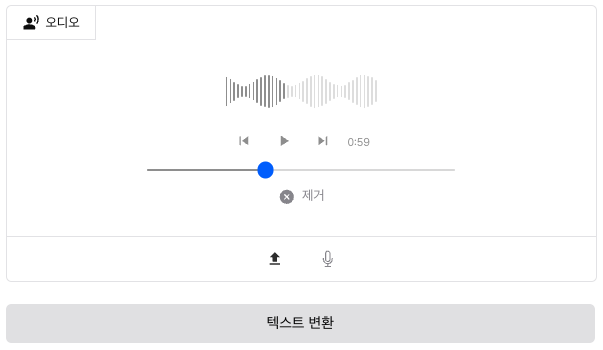
현재 음성을 업로드 후 오디오 컴포넌트에 표시되어 있는 것은 아래와 같이 구현되어 있다.
이제 위 파일을 인풋으로 보내어 FastAPI에서 처리하고
텍스트 변환 응답값을 내려받아 처리하는 함수를 만들고자 한다.
먼저 Transformer의 pipeline 함수에서 다음과 같은 태스크를 선언하자.
whisper = pipeline("automatic-speech-recognition", model="openai/whisper-base")
그리고 다음과 같은 라우터를 선언할 예정이다.
@router.post("/audio_to_text", summary="transfer audio to text")
async def audioToText(input_audio_path: str):
    pass
가장 먼저 로컬 서버에 업로드 된 파일을 실제 로컬 폴더의 path로 변환하는 과정을 거쳐야 한다.
file_path = input_audio_path.replace("http://localhost:8000", "").lstrip("/")
project_root = Path(__file__).parent.parent.parent.parent.parent
full_path = project_root / file_path
그리고 이 path를 whisper에 연결하여 결과를 확인한다.
result = whisper(str(full_path))
결과를 확인하기 위해 프론트엔드단에서 처리하자.
const handleTransferText = async () => {
        try {
            const response = await fetch(`http://localhost:8000/api/v1/audio_to_text?input_audio_path=${uploadedAudio}`, {
                method: "POST"
            });
            const data = await response.json();
            console.log(data)
        } catch (error) {
            console.error("Transfer failed:", error);
        }
    }
결과 값은 아래와 같이 디버깅 된다.

올바로 처리 된 것 같다. 이제 이것을 응답값으로 넘기고 프론트엔드에서
따로 상태 값으로 저장해 UI에 뿌려주면 될 것으로 보인다.
@router.post("/audio_to_text", summary="transfer audio to text")
async def audioToText(input_audio_path: str):

    file_path = input_audio_path.replace("http://localhost:8000", "").lstrip("/")

    project_root = Path(__file__).parent.parent.parent.parent.parent
    full_path = project_root / file_path

    # 음성 인식 처리
    result = whisper(str(full_path))

    return {"text": result["text"]}
이 값을 저장하기 위해 먼저 app/sound_assistant/page.tsx에서 useState 통해 상태 값을 선언한다.
const [audioToTextValue, setAudioToTextValue] = useState<string>("")
이것을 값을 받아 값을 바꿔주는 함수를 선언해서 넘겨주자.
const changeAudioToText = (data: string) => {
    setAudioToTextValue(data);
}
<AudioComponent changeAudioToText={changeAudioToText} />
이제 src/components/AudioComponent.tsx 에서 change 함수 처리를 한다.
const handleTransferText = async () => {
        try {
            const response = await fetch(`http://localhost:8000/api/v1/audio_to_text?input_audio_path=${uploadedAudio}`, {
                method: "POST"
            });
            const data = await response.json();
            changeAudioToText(data.text)
        } catch (error) {
            console.error("Transfer failed:", error);
        }
 }
이제 그 값을 첫번째 CommonPut.tsx 컴포넌트에 넣어주어 UI에 업데이트한다.
<CommonPut put={"output"} label={"텍스트 변환"} height={110} highHeight={150} value={audioToTextValue} />
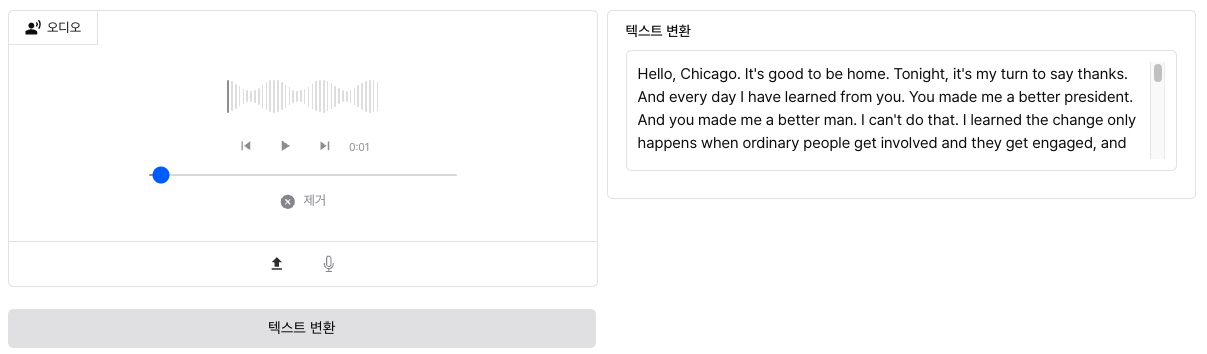
그럼 다음과 같이 결과 UI가 나온다.
3단계 : 변환된 텍스트를 이용해 질문하기
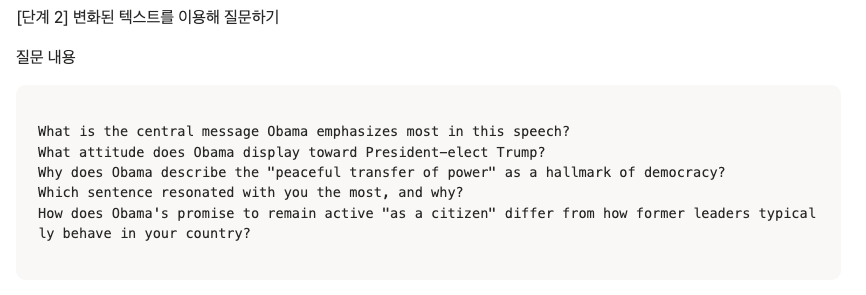
이제 질문에 대한 답변을 얻기 위해 두 번째 pipeline 태스크가 필요한 상황으로 보인다.
text_generation = pipeline("text-generation")
이제 직접 프롬프팅을 통해 답변을 도출해내야 한다.
기존 텍스트 변환 내용 기반으로 답변을 해주어야 하므로, 기존 텍스트 변환 내용도 넘겨주어야 한다.
그래서 이전 라우팅에서 내용과 현재에서도 이 변수를 공유하려면, 전역 변수를 이용하자.
voice_txt, current_answer = ""
여기서 current_answer는 다음 단계에서 똑같은 과정을 거칠 것이므로 일단 참고만 해두자.
기존 텍스트 변환 라우터를 다음과 같이 수정하자.
@router.post("/audio_to_text", summary="transfer audio to text")
async def audioToText(input_audio_path: str):
    global voice_txt

    file_path = input_audio_path.replace("http://localhost:8000", "").lstrip("/")

    project_root = Path(__file__).parent.parent.parent.parent.parent
    full_path = project_root / file_path

    # 음성 인식 처리
    result = whisper(str(full_path))
    voice_text = result["text"]

    return {"text": result["text"]}
현재 질문 라우팅은 다음과 같이 설정하자.
@router.post("/text_generation", summary="text generation")
async def generate_text(question: str):
    global voice_txt

    if not voice_txt:
        return {"status": "fail", "message": "음성을 텍스트로 변환 후 질문하세요"}

    # 간단한 응답 생성 (영어 프롬프트 사용)
    prompt = f"Based on: {voice_txt[:100]}\nQuestion: {question}\nAnswer: "

    try:
        result = text_generation_pipeline(prompt, max_new_tokens=100, do_sample=True, top_p=0.95)
        generated_text = result[0]["generated_text"].strip()

        # 프롬프트 부분 제거하고 답변만 추출
        answer_start = generated_text.find("Answer:")
        if answer_start != -1:
            final_answer = generated_text[answer_start + 7:].strip()
        else:
            final_answer = generated_text

        return {
            "status": "success",
            "message": final_answer,
        }
    except Exception as e:
        return {
            "status": "fail",
            "message": f"텍스트 생성 중 오류가 발생했습니다: {str(e)}"
        }
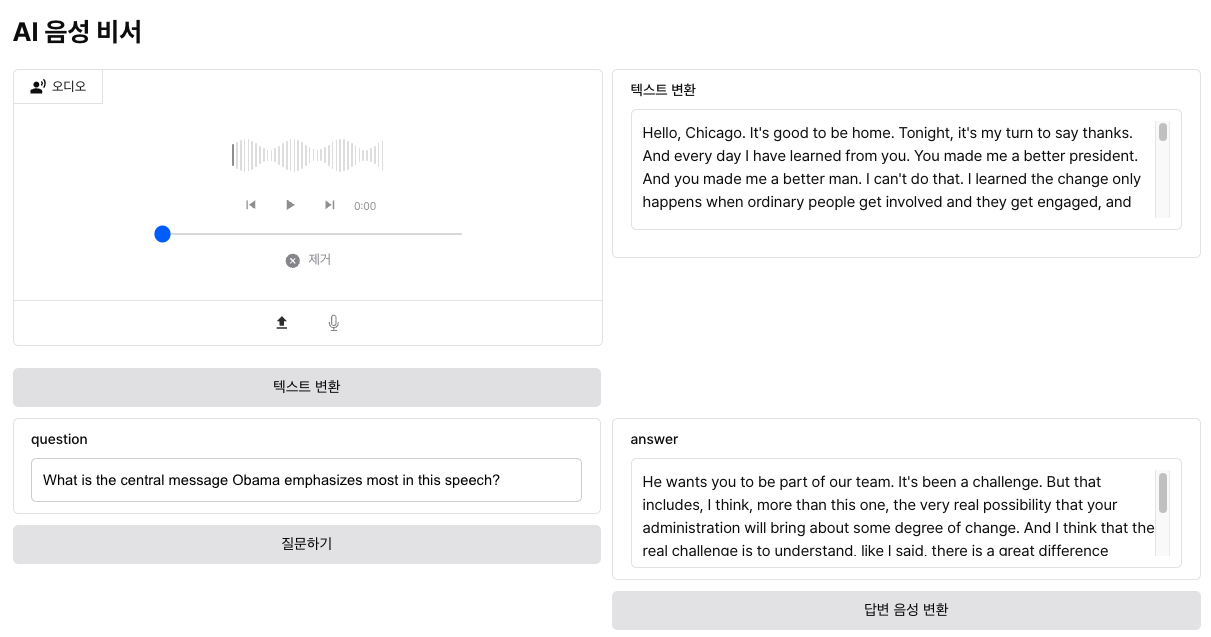
이것을 토대로 프론트엔드 설정해보자.
먼저 questionValue를 통해 질문 데이터를 관리한다.
const [questionValue, setQuestionValue] = useState<string>("");
또 onChange 함수를 연결한다.
const changeQuestionValue = (e: React.ChangeEvent<HTMLInputElement>) => {
   setQuestionValue(e.target.value)
}
다음은 answerValue를 관리하자.
const [answerValue, setAnswerValue] = useState<string>("");
또, change 함수를 통해 순수함수를 구현하여, answerValue를 받아오자.
 const changeAnswerValue = (data: string) => {
    setAnswerValue(data)
 }
이제 PutCommon.tsx 컴포넌트에서 status가 성공할 경우에만 응답값을 받아오자.
const quest = async () => {
        try {
            const response = await fetch(`http://localhost:8000/api/v1/text_generation?question=${questionValue}`, {
                method: "POST"
            })
            const data = await response.json()
            if (data.status === "success") {
                changeAnswerValue(data.message)
                console.log(data.message)
            } else {
                console.error(data.message)
            }
        } catch (error) {
            console.log(error)
        }
 }
4단계 : 답변을 음성으로 듣기
현재 받은 답변을 기반으로 다시 음성으로 변환하는 TTS 기능을 구현해보자.
아까 전역 변수로 선언한 current_answer를 이용해보자.
먼저 TTS 함수 만들자.
async def text_to_voice(text):
    voice = "ko-KR-InJoonNeural"

    # 타임스탬프를 포함한 파일명 생성
    timestamp = datetime.now().strftime("%Y%m%d_%H%M%S")
    filename = f"answer_{timestamp}.mp3"
    filepath = ANSWER_DIR / filename

    communicate = edge_tts.Communicate(text, voice)
    await communicate.save(str(filepath))

    # 파일 URL 반환
    file_url = f"http://localhost:8000/answer/{filename}"
    return file_url
이걸 이용해 API 함수 만들자.
@router.post("/tts", summary="text-to-speech")
async def tts():
    global current_answer
    if not current_answer:
        return {"status": "fail", "message": "변환할 텍스트가 없습니다"}

    try:
        file_url = await text_to_voice(current_answer)
        return {
            "status": "success",
            "audio_url": file_url
        }
    except Exception as e:
        return {
            "status": "fail",
            "message": f"음성 변환 중 오류가 발생했습니다: {str(e)}"
'AI > LLM' 카테고리의 다른 글
| 랭체인(LangChain) - 개념 (1) (0) | 2026.06.06 |
|---|---|
| 올라마(Ollama) - 개념 및 실습 (0) | 2026.06.06 |
| 허깅 페이스(Hugging Face) - 감정 분석 앱 (6) (0) | 2026.06.05 |
| 허깅 페이스(Hugging Face) - 멀티 모달 (5) (0) | 2026.06.02 |
| 허깅 페이스(Hugging Face) - 트레이너 API (4) (0) | 2026.05.28 |