2026. 6. 6. 15:37ㆍAI/LLM
1. 랭체인 (LangChain)
- LLM 기반 애플리케이션 개발을 위해서 사용하는 JS/Python 기반 프레임워크
- Prompt - LLM - OutputParser 흐름을 체인으로 연결하는 파이프라인 도구
- RAG, Agent, Memory, Tools 등 복잡한 패턴을 표준화된 인터페이스로 제공
- Ollama, OpenAI, HuggingFace, Watsonx 등 LLM 백엔드를 동일한 코드로 교체
1) 구성요소
- langchain-core : 프롬프트, 템플릿, 아웃풋 파서 등 랭체인의 기본적인 추상화와 인터페이스 제공
- LCEL : 여러 단계를 거쳐 처리되는 작업 흐름(체인)을 코드 몇줄로 간단하고 직관적으로 만드는 문법
- LangGraph : 복잡한 워크플로우와 에이전트 시스템을 구축하는 그래프 기반 프레임워크
- LangServe : LangChain 애플리케이션을 API로 제공하는 서빙 프레임워크
- LangSmith : 개발, 테스트, 모니터링을 위한 디버깅 관찰 도구
2) 설치 및 환경 구성
pip install langchain langchain-community langchain-ollama langchain-corefrom langchain_ollama import ChatOllama
from langchain_ibm import ChatWatsonx
from langchain_core.prompts import PromptTemplate, ChatPromptTemplate
from langchain_core.output_parsers import StrOutputParser, JsonOutputParser, PydanticOutputParser
3) LangChain + Watsonx
# Watsonx 설정
load_dotenv()

api_key = os.getenv("WATSONX_API_KEY")
project_id = os.getenv("WATSONX_PROJECT_ID")
watsonx_ai_url = os.getenv("WATSONX_AI_URL")
# Langchain Frameworks 안에 Watsonx 사용하기
watson_llm = ChatWatsonx(
model_id="ibm/granite-4-h-small",
url=watsonx_ai_url,
api_key=api_key,
project_id=project_id,
max_tokens = 2000
)
response = watson_llm.invoke("생성형 AI를 설명해줘.")
print(response.content)
4) LangChain + Ollama
# Langchain Frameworks 안에 Ollama 사용하기
qwen_llm = ChatOllama(model="qwen3.5:4b")

response = qwen_llm.invoke("생성형 AI를 설명해줘")
print(response.content)
5) PromptTemplate
변수가 있는 프롬프트 틀로써, f-string과 유사하지만, 타입 검증과 재사용성을 제공한다.
하나의 문자열 프롬프트를 생성한다.
### 기본 생성
template = PromptTemplate(input_variables=['topic','level'],template="{level} 수준으로 {topic}를 설명해줘. 예시 포함")
print(template.input_variables)
prompt_txt = template.format(topic="재귀 함수", level="초급자")
print(prompt_txt)
아래는 input_variables 설정을 없애고 간소화한 코드이다.
template = PromptTemplate.from_template("{level} 수준으로 {topic}을 설명해줘. 예시 포함")
print(template.input_variables)
prompt_txt = template.format(topic="재귀함수",level="초급자")
print(prompt_txt)
template = PromptTemplate.from_template("""
다음 질문에 답변하세요.

질문:
{question}
""")

formatted_prompt = template.format(question="SQL Injection 이란?")
response = watson_llm.invoke(formatted_prompt)
print(response.content)
6) ChatPromptTemplate
채팅 메시지 형식을 제공하고, from_template()과 from_messages() 메소드를 제공한다.
from_template()의 경우 human 메시지만 생성하지만
from_messages()의 경우 여러 메시지를 구성할 수 있다.
from_template
template = ChatPromptTemplate.from_template("""\
다음 질문에 답변하시오.

질문:
{question}

""")

formatted_prompt = template.format(question="SQL Injection에 대해 설명해줘")
response = watson_llm.invoke(formatted_prompt)
print(response.content)
from_messages
template = ChatPromptTemplate.from_messages(
    [
        ("system", "당신은 {role} 전문가입니다. {language}로 답변하세요"),
        ("human","{question}")
    ]
)

formatted_prompt = template.format(role="파이썬",language="한국어",question="리스트 컴프리헨션 이란?")
response = watson_llm.invoke(formatted_prompt)
print(response.content)
7) LCEL 파이프라인
| 연산자로 컴포넌트를 연결하는 파이프라인 문법으로써, 왼쪽에서 오른쪽으로 데이터가 흐르는 흐름을 제어할 수 있다.
invoke(), stream(), batch() 3가지 메소드를 제공한다.
invoke : 단일 동기 호출
prompt = ChatPromptTemplate.from_messages(
    [
        ("system", "당신은 {role} 전문가입니다."),
        ("human", "{question}")
    ]
)

parser = StrOutputParser()

chain = prompt | watson_llm | parser

response = chain.invoke({
    "role": "보안",
    "question": "XSS란?"
})

print(response)
stream : 스트리밍 형태
for chunk in chain.stream({"role": "보안","question": "XSS란?"}):
    print(chunk, end="",flush=True)
batch : 여러 요청을 병렬 처리
# batch() : 여러 입력을 병렬로 처리

results = chain.batch([
    {
        "role": "보안",
        "question": "XSS란?"
    },
    {
        "role": "Python",
        "question": "List란?"
    },
    {
        "role": "Python",
        "question": "Dictionary란?"
    },
    {
        "role": "Java",
        "question": "Class란?"
    }
])

for result in results:
    print(result)
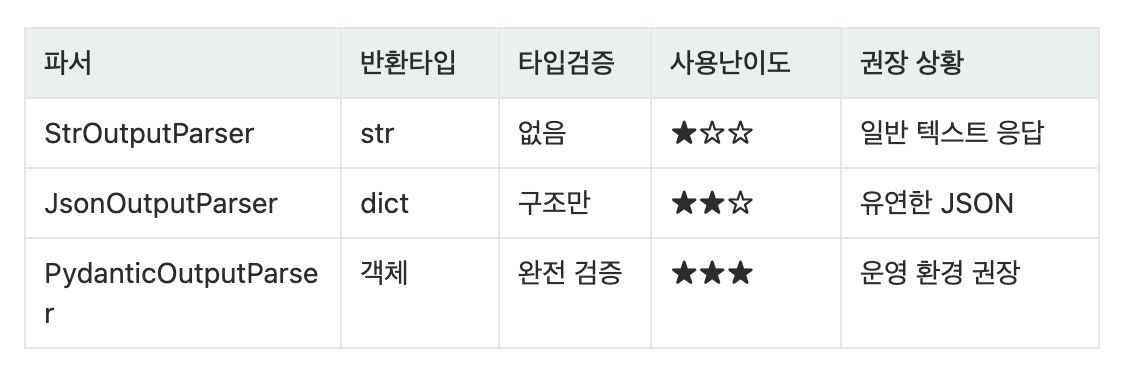
8) 출력 파서(OutputParser)
1. StrOutputParser
parser = StrOutputParser()

str_chain = ChatPromptTemplate.from_template("{topic}을 한 문장으로 설명해줘.") | qwen_llm | parser

result = str_chain.invoke({"topic": "머신러닝"})

print(result)
2. JsonOutputParser
parser = JsonOutputParser()

json_chain = ChatPromptTemplate.from_messages([
    ("system","JSON 형식으로만 응답하세요."),
    ("human","{text}의 감정을 분석해서 {{'sentiment': '...', 'score': 0.0}} 형태로 출력하세요.")
]) | qwen_llm | parser

result = json_chain.invoke({ "text": "오늘 정말 행복한 하루였어요." })
print(result['sentiment'])
print(result['score'])
3. PydanticOutputParser
- 반환 타입은 객체이다.
- 입력 데이터 타입을 검증, 타입 자동 변환
- 에러 메시지가 정확함.
- 코드가 간결해짐
- FastAPI와 호환 잘됨
- json 변환이 쉽다.
다음은 Pydantic 입력 데이터 타입 검증 예제이다.
class User(BaseModel):
    name:str
    age:int

# 객체 생성
user = User(name="홍길동",age="20")
print(user)
print(type(user.age))
user = User(name="홍길동",age="스무살")
class User(BaseModel):
    name:str
    age:int = Field(gt=0)

user = User(name="홍길동", age="0")
이번엔 직접 체이닝 예제로 적용시켜보자.
# 감정, 점수, 이유, 키워드 3개
# Pydantic 모델 정의

class SentimentResult(BaseModel):
    sentiment: Literal["postive","negative","neutral"]
    score: float = Field(ge=0.0,le=1.0,description="감정 강도")
    reason:str = Field(description="판단 근거 한 문장")
    keywords:list[str] = Field(description="핵심 키워드 3개 이내")

# 파서 정의
pydantic_parser = PydanticOutputParser(pydantic_object=SentimentResult)

# 프롬프트
# {format_instructions} : pydantic_parser에서 필드를 참고해서 작성
pydantic_prompt = ChatPromptTemplate.from_messages([
    ("system","감정 분석 전문가입니다.\n\n {format_instructions}"),
    ("human","다음 텍스트의 감정을 분석하세요 :\n {text}")
]).partial(format_instructions=pydantic_parser.get_format_instructions())

pydantic_chain = pydantic_prompt | qwen_llm | pydantic_parser

result = pydantic_chain.invoke({
    "text": "오늘 최악의 하루였습니다. 모든게 잘못됐어요."
})

print(result)
print(result.sentiment)
print(result.score)
print(result.keywords)
print(result.reason)
'AI > LLM' 카테고리의 다른 글
| 랭체인(LangChain) - 심화 내용 (3) (0) | 2026.06.20 |
|---|---|
| 랭체인(LangChain) - 요리 전문가 챗봇 실습 (2) (0) | 2026.06.20 |
| 올라마(Ollama) - 개념 및 실습 (0) | 2026.06.06 |
| 허깅 페이스(Hugging Face) - 음성 비서 앱 (7) (0) | 2026.06.05 |
| 허깅 페이스(Hugging Face) - 감정 분석 앱 (6) (0) | 2026.06.05 |