2026. 6. 20. 15:42ㆍAI/LLM
1. RunnableSequence
파이프라인 문법에서 자세히 보면, RunnableSequence라고 하는 것을 내부적으로 생성한다.
그 중에는 다음과 같은 종류가 있다.
- RunnablePassthrough : 입력을 통과시켜 다른 키와 병합
- RunnableLambda : 체인을 파이썬 함수와 연동
- RunnableParallel : 여러 체인을 동시에 실행하고 결과를 dict 구조로 병합
- .assign() : 체인 중간에 새 키를 추가하는 메소드
1) RunnableLambda
chain은 RunnableSequence를 생성하기 때문에 일반 파이썬 함수는 바로 연결 불가하다.
이럴 때 일반 함수를 감싸는 용도로 사용한다.
from langchain_core.runnables import RunnableLambda

def upper(text):
    return text.upper()

prompt = ChatPromptTemplate.from_messages([
    ("system","당신은 언어 전문가입니다."),
    ("human","{topic}에 대해 설명해줘.")
])

chain = prompt | qwen_llm | StrOutputParser() | RunnableLambda(upper)

result = chain.invoke({ "topic" : "python" })

print(result)
# 후처리 함수
def remove_newline(text):
    return text.replace("\n"," ")

prompt = ChatPromptTemplate.from_template("{question}에 대해 답변해줘.")

chain = prompt | qwen_llm | StrOutputParser() | RunnableLambda(remove_newline)

print(chain.invoke({ "question": "Python의 리스트"}))
2) RunnablePassThrough
변수에 들어온 값이 RunnablePassthrough()에 전달되어 통과되는 개념이다.
from langchain_core.runnables import RunnablePassthrough

prompt = ChatPromptTemplate.from_template("{question}에 대해 답변해줘.")

chain = (
    { "question": RunnablePassthrough(), "answer": prompt | qwen_llm | StrOutputParser()} | RunnableLambda(lambda x: f"Q: {x['question']}\nA:{x['answer']}")
)

result = chain.invoke("파이썬이란?")
print(result)
3) RunnableParallel
여러 체인을 호출할 때 사용하며, 병렬처리 성능은 실제 컴퓨터 자원에 영향을 받는다.
from langchain_core.runnables import RunnableParallel

parser = StrOutputParser()

# 요약
summary_chain = ChatPromptTemplate.from_template("다음 텍스트를 한 문장으로 요약하세요. 한국어로. : {text}") | qwen_llm | parser

# 키워드 추출
keyword_chain = ChatPromptTemplate.from_template("다음 텍스트의 핵심 키워드 3개를 ,로 나열해줘 : {text}") | qwen_llm | parser

parallel_chain = RunnableParallel(summary=summary_chain,keyword=keyword_chain)

result = parallel_chain.invoke({ "text" : "인공지능은 인간의 지능을 모방하는 기술로..." })

print(result)
4) assign()
analysis_chain = ChatPromptTemplate.from_template("다음 리뷰를 분석해줘 : {review}") | qwen_llm | parser | {"text": RunnablePassthrough() }

full_chain = (RunnablePassthrough.assign(summary=ChatPromptTemplate.from_template("{review} 한 줄 요약") | qwen_llm | parser)
                                 .assign(sentiment=ChatPromptTemplate.from_template("{review} 감정 분석 : 긍정, 부정, 중립 중 하나만") | qwen_llm | parser))
                                 .assign(analysis=analysis_chain)

result = full_chain.invoke({"review": "정말 맛있는 음식이었어요."})

print(result)
2. 멀티 턴 대화
LLM은 기본적으로 Stateless 특성을 가진다. 이전 내용을 유지하는 방법을 배워보자.
이력 관리를 위해 messages 리스트에 누적이 필요하다. 그리고 그 내용을 보내줘야 한다.
from langchain_core.messages import HumanMessage, SystemMessage, AIMessage

messages = [
    SystemMessage(content="당신은 친절한 파이썬 튜터입니다. 한국어로 답변하세요.")
]

def chat(user_input):
    messages.append(HumanMessage(user_input))
    response = qwen_llm.invoke(messages)
    messages.append(AIMessage(response.content))
    return response.content

print(chat("파이썬이란?"))
print(chat("방금 말한 내용의 장점 3가지는?"))
print(chat("그 중 첫번째 장점에 대한 예시 코드 작성해줘."))
print(chat("두 번째 장점에 대한 예시 코드 작성해줘."))

for m in messages:
    print(f"[{m.type}] {m.content[:40]}...")
하지만, 이렇게 하지 않고, 자동으로 이력 관리를 해주는 개념이 나온다.
이것이 RunnableWithMessageHistory이다. 세션별로 대화 이력 관리를 하는 방식이다.
일단, InMemoryChatMessageHistory 객체를 이용한다. (메모리에 대화를 저장)
from langchain_core.chat_history import InMemoryChatMessageHistory

history = InMemoryChatMessageHistory()

def chat(user_input):
    history.add_user_message(user_input)
    response = qwen_llm.invoke(history.messages) # 전체 대화 맥락 보내주기
    history.add_ai_message(response.content)
    return response.content

chat("파이썬이란?")
chat("방금 말한 내용의 장점 3가지는?")
chat("그 중 첫번째 장점에 대한 예시 코드 작성해줘.")
chat("두 번째 장점에 대한 예시 코드 작성해줘.")

for m in history.message:
    print(f"[{m.type}] {m.content[:40]}...")
그러나 이 방식에는 한계가 있다. 만약 메모리에다가 계속 쌓는다면, 메모리 부하가 생길지도 모른다.
그리고 모델의 한계 컨텍스트 크기도 넘어갈 수 있다. (컨텍스트 오버플로우)
그전에 먼저 세션에 저장해서 기록하는 방법부터 알아보자. (여러 사람과 대화하는 것을 고민)
그것이 RunnableWithMessageHistory 객체이다.
# 여러 사람과 대화하는 부분 저장 => 세션별로 저장

store = {}

def get_session_history(session_id) -> BaseChatMessageHistory:
    if session_id not in store:
        store[session_id] = InMemoryChatMessageHistory()
    return store[session_id]

# 프롬프트 생성
prompt = ChatPromptTemplate.from_messages([
    ("system", "당신은 {role}입니다. 한국어로 답변하세요."),
    MessagesPlaceholder(variable_name="history"), # 대화 이력이 삽입될 위치임을 알려줌
    ("human", "{input}")
])

# LLM 생성 문구
qwen_llm = ChatOllama(model='qwen2.5')

# 체인 생성
chain = prompt | qwen_llm | StrOutputParser()

# 1. session_id 이력 조회

# 2. 없다면 history 키에 이력 삽입 -> prompt -> llm 실행 -> 대화 나눈 이력을 history에 추가

with_history = RunnableWithMessageHistory(chain, get_session_history=get_session_history, input_messages_key="input", history_messages_key="history")

# 세션 생성
config_a = { "configurable": {"session_id": "user_alice"}}
config_b = { "configurable": {"session_id": "user_bob"}}

res1 = with_history.invoke({ "role": "파이썬 튜터", "input": "안녕"}, config=config_a)
res2 = with_history.invoke({ "role": "파이썬 튜터", "input": "내 이름은 Alice야."}, config=config_a)
res4 = with_history.invoke({ "role": "파이썬 튜터", "input": "내 이름 기억해?"}, config=config_a)

res3 = with_history.invoke({ "role": "파이썬 튜터", "input": "파이썬 변수 타입은?"}, config=config_b)


print("Alice ", res2)
print("Alice ", res4)
컨텍스트 관리를 위해 개선하는 방향을 알아보자.
1) 최근 K 턴만 유지하기 (K=8)
def get_session_history(session_id) -> BaseChatMessageHistory:
    if session_id not in store:
        store[session_id] = InMemoryChatMessageHistory()

    # 최근 몇개만 유지
    history = store[session_id]

    if len(history.messages) > 8:
        history.messages[:] = history.messages[-8:]

    return history

with_history = RunnableWithMessageHistory(chain, get_session_history=get_session_history, input_messages_key="input", history_messages_key="history")

for i in range(10):
    with_history.invoke({ "role": "파이썬 튜터", "input": f'{i}번째 질문'}, config=config_a)

history = get_session_history("user_alice")

for msg in history.messages:
    print(msg)

print(len(history.messages))
2) 오래된 내용은 압축해서 보여주기
# 2. 오래된 대화 요약

store = {}

# 요약 프롬프트
summary_prompt = ChatPromptTemplate.from_messages([
    ("system", "다음 대화 내용을 핵심만 3문장 이내로 한국어로 요약하세요."),
    ("human", "{conversation}")
])

# 요약 체인
summaries_chain = summary_prompt | qwen_llm | StrOutputParser()

# 요약 기능이 포함된 클래스
class SummarizedChatHistory(InMemoryChatMessageHistory):
    """대화가 max_turns 초과 시 오래된 메시지 요약하기"""
    max_turns: int = Field(default=6)
    summary: str = Field(default="")

    def _maybe_summarize(self):
        if len(self.messages) > self.max_turns * 2:
            # 오래된 내용 찾기
            cutoff = len(self.messages) // 2
            old_msgs = self.messages[:cutoff]
            new_msgs = self.messages[cutoff:]

            # 요약할 텍스트 구성
            conv_text = "\n".join(f"{'사용자' if isinstance(m, HumanMessage) else "AI"}: {m.content}" for m in old_msgs)

            # 기존 요약이 있으며 함께 포함
            if self.summary:
                conv_text = f"[이전 요약]\n{self.summary}\n\n[새 대화]\n{conv_text}"

            # 요약 실행
            self.summary = summary_chain.invoke({ "conversation": conv_text })

            # 오래된 메시지 제거 후 요약본 SystemMessage로 앞에 삽입
            self.messages.clear()
            self.messages.append(SystemMessage(content=f"[이전 대화 요약]\n{self.summary}"))
            self.messages.extend(new_msgs)

    def add_message(self, message):
        super().add_message(message)
        self._maybe_summarize()


def get_session_history(session_id) -> SummarizedChatHistory:
    if session_id not in store:
        store[session_id] = SummarizedChatHistory(max_turns=6)

    return store[session_id]

prompt = ChatPromptTemplate.from_messages([
    ("system", "당신은 친절한 AI 어시스턴트입니다. 한국어로 답변하세요"),
    MessagesPlaceholder(variable_name="history"),
    ("human", "{input}")
])

chain = prompt | qwen_llm | StrOutputParser()

with_history = RunnableWithMessageHistory(chain, get_session_history=get_session_history, input_messages_key="input", history_messages_key="history")

# 세션 임의 생성
cfg_a = {"configurable": { "session_id": "user_alice"}}

# 임의 대화 생성
questions = [
    "파이썬이란?",
    "방금 설명한 파이썬의 장점은?",
    "단점은 뭐야?",
    "어떤 분야에 많이 쓰여?",
    "입문자에게 추천하는 학습 순서는?",
    "좋은 파이썬 책 추천해줘",
    "무료로 배울 수 있는 사이트는?",
    "이전에 내가 뭘 물어봤는지 기억해?"
]

for i, q in enumerate(questions, i):
    response = with_history.invoke({"input": q}, config=cfg_a)
    print(f"\n{i}턴 Q:{q}")
    print(f"\n      A: {response[:60]}....")

    # 요약 여부 확인
    history = get_session_history("user_alice")
    if history.summary:
        print(f"\n 요약 처리! 현재 메시지 수 {len(history.messages)}")
        print(f"\n 요약 내용 {history.summary[:80]}....")
3) 요리 전문가 챗봇 백엔드 수정하기 (수작업X, 메시지 히스토리 객체 이용)
from fastapi import APIRouter
from app.schemas.chat import ChatRequest, ChatResponse, ChatPairResponse, LLMChatOutput
from langchain_ollama import ChatOllama
from langchain_core.prompts import ChatPromptTemplate, MessagesPlaceholder
from langchain_core.chat_history import (
    InMemoryChatMessageHistory,
    BaseChatMessageHistory,
)
from langchain_core.messages import HumanMessage, AIMessage
from langchain_core.runnables.history import RunnableWithMessageHistory

router = APIRouter()

store = {}


def chain_return():
    structured_llm = ChatOllama(model="qwen2.5")

    system_prompt = """
    당신은 20년 경력의 전문 세프이자, 요리 연구가입니다.
    사용자의 요리 질문에 대해 재료, 조리방법, 실패 방지 팁, 대체 재료를 포함하여 답변하세요.
    항상 한국어로 답변하세요.
    """

    template = ChatPromptTemplate.from_messages(
        [
            ("system", system_prompt),
            MessagesPlaceholder(variable_name="history"),
            ("human", "{question}"),
        ]
    )

    chain = template | structured_llm

    return RunnableWithMessageHistory(
        chain,
        get_session_history,
        input_messages_key="question",
        history_messages_key="history",
    )


def get_session_history(session_id: int) -> BaseChatMessageHistory:
    if session_id not in store:
        store[session_id] = InMemoryChatMessageHistory()
    return store[session_id]


@router.post("/chat-input", response_model=ChatPairResponse)
async def chat(body: ChatRequest) -> str:
    session_id = body.session_id
    message = body.message

    chain = chain_return()

    cfg_user = {"configurable": {"session_id": session_id}}

    # llm_chat_output
    response = chain.invoke({"question": message}, config=cfg_user)

    chat_user_response = ChatResponse(
        session_id=session_id, sender="me", content=message
    )

    chat_bot_response = ChatResponse(
        session_id=session_id + 1, sender="bot", content=response.content
    )

    return ChatPairResponse(chats=[chat_user_response, chat_bot_response])
3. 번외 : 허깅 페이스 모델 사용하기
허깅 페이스에서 Models 항목에서 이 옵션을 체크한다. (외부에서 불러다 쓸 수 있는 모델)

우리는 Qwen2.5-Coder-7B-Instruct 모델을 사용해보자.
모델 상세페이지에 들어가 View Code Snippets 클릭한다.
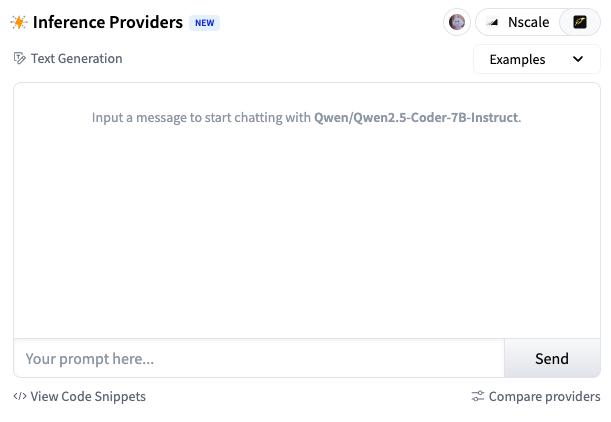
우리는 openai를 이용하여 접근할 것인데, 코드 보면 알다시피 HF_TOKEN이 필요하다.
이것은 Access Token 탭에 들어가 발급받는다.
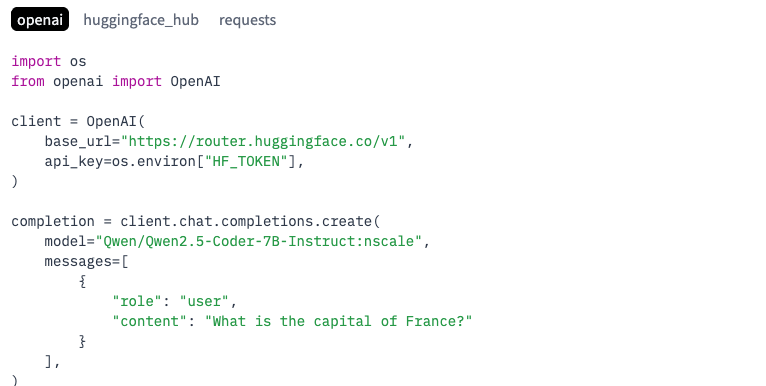
load_dotenv()

hf_token = os.getenv("HF_TOKEN")

client = OpenAI(
    base_url="https://router.huggingface.co/v1",
    api_key=hf_token,
)

completion = client.chat.completions.create(
    model="Qwen/Qwen2.5-Coder-7B-Instruct:nscale",
    messages=[
        {
            "role": "user",
            "content": "What is the capital of France?"
        }
    ],
)
그리고, langchain에서도 openai 항목을 지원한다.
from langchain_openai import ChatOpenAI

hugging_llm = ChatOpenAI(model="Qwen/Qwen2.5-Coder-7B-Instruct",api_key=hf_token,base_url="https://router.huggingface.co/v1")

response = hugging_llm.invoke("생성형 AI 설명해줘.")

print(response.content)
'AI > LLM' 카테고리의 다른 글
| 검색 증강 생성(RAG) - PDF RAG 학습 앱 (2) (0) | 2026.06.21 |
|---|---|
| 검색 증강 생성(RAG) - 개념 (1) (0) | 2026.06.20 |
| 랭체인(LangChain) - 요리 전문가 챗봇 실습 (2) (0) | 2026.06.20 |
| 랭체인(LangChain) - 개념 (1) (0) | 2026.06.06 |
| 올라마(Ollama) - 개념 및 실습 (0) | 2026.06.06 |