랭체인(LangChain) - 요리 전문가 챗봇 실습 (2)
2026. 6. 20. 01:19ㆍAI/LLM
다음 조건으로 요리 전문가 챗봇 앱을 제작해보자.
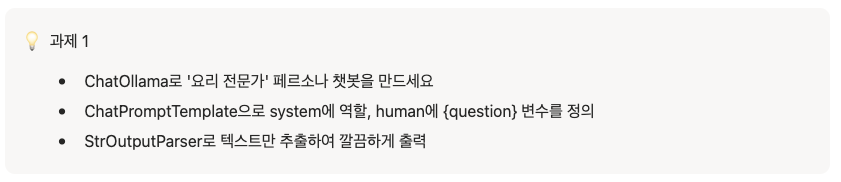
일단 UI 먼저 구성해보자. 다음과 같이 구성한다.

src/app/food/page.tsx
import ChatBotDiv from "@/components/food/ChatBotDiv";

export default function FoodPage() {
    return (
        <main className="w-full h-screen bg-[#ece0cb]">
            <div id="wrap" className="max-w-lg mx-auto h-full bg-[#f6eddf]">
                <ChatBotDiv />
            </div>
        </main>
    )
}
src/app/components/food/ChatBotDiv.tsx
"use client";

import { useEffect, useState } from "react";
import { useRouter } from "next/navigation";
import { IoArrowForwardSharp } from "react-icons/io5";
import BotChatting from "./BotChatting";
import ChatBotProfile from "./ChatBotProfile";
import HumanChatting from "./HumanChatting";


export interface ChatContent {
    session_id: number;
    sender: "bot" | "me";
    content: string;
    added_button_list: string[] | null
}

export default function ChatBotDiv() {

    const [inputText, setInputText] = useState<string>("");

    const [chatContents, setChatContents] = useState<ChatContent[]>([{ session_id: 0, sender: "bot", content: "안녕~ 어서와요 ^^ 오늘은 뭐가 드시고 싶어요?|냉장고에 뭐가 있는지 말하면 딱 맞는 메뉴 말해줄게요.", added_button_list: ["10분 안에 되는 메뉴", "자취 첫 요리 추천", "계란으로 뭐 해먹지?"] }]);

    const [showedManyButton, setShowedManyButton] = useState<boolean>(true);

    const changeShowed = (bool: boolean) => {
        setShowedManyButton(bool)
    }

    const router = useRouter();

    const changeInput = (e: React.ChangeEvent<HTMLInputElement>) => {
        setInputText(e.target.value)
    }


    return (
        <div id="chatBotDiv" className="w-full h-full relative">
            <div id="chatBotHeader" className="w-full h-[70px] relative box-border bg-[#faf3e9] flex items-center gap-[10px] px-[16px] border-b-[1px] border-[#e6e0d2] ">
                <ChatBotProfile />
                <div id="chatBotInfo" className="flex flex-col justify-between">
                    <span className="font-[800]">정이 이모</span>
                    <div className="status flex items-center gap-[5px] text-[#9a7b52] text-[14px]">
                        <span className="block w-[8px] h-[8px] rounded-full bg-[#7fa968]"></span>
                        <span>온라인</span>
                        <span>오늘 뭐 해먹지?</span>
                    </div>
                </div>
                <button className="text-[14px] absolute right-[20px] cursor-pointer" onClick={() => router.push("/")}>돌아가기</button>
            </div>
            <div id="chatBotBody" className="w-full h-[calc(100%-150px)] overflow-y-auto p-[16px] flex flex-col gap-[20px]">
                {
                    chatContents.map((chat: ChatContent) => (
                        chat.sender === 'bot' ? <BotChatting key={chat.session_id} chatting={chat} showed={showedManyButton} changeShowed={changeShowed} /> : <HumanChatting key={chat.session_id} chatting={chat} />
                    ))
                }
            </div>
            <div id="chatBotFooter" className="w-full h-[80px] bg-[#f9f2e8] absolute bottom-0 left-0 p-[20px] box-border">
                <div id="inputWrap" className="w-full h-[50px] box-border px-[10px] rounded-[20px] bg-[#fffdf8] border-[#7a5636] border-[1px] border-[#7a5636] flex items-center gap-[10px]">
                    <input type="text" className="flex-1 h-full outline-none px-[20px] placeholder:text-[#c9baa7]" placeholder="냉장고에 뭐가 있어요?" value={inputText} onChange={changeInput} />
                    <button className="w-[36px] h-[36px] rounded-full bg-[#c98a52] flex justify-center items-center disabled:opacity-45 cursor-pointer" disabled={!inputText.trim()}>
                        <IoArrowForwardSharp className="text-white text-[20px]" />
                    </button>
                </div>
            </div>
        </div>
    )
}
src/app/components/food/BotChatting.tsx
import { type ChatContent } from "./ChatBotDiv";
import ChatBotProfile from "./ChatBotProfile";

export default function BotChatting({ chatting, showed, changeShowed }: { chatting: ChatContent, showed: boolean, changeShowed: (bool: boolean) => void }) {
    return (
        <div className="bot__chat flex flex-wrap gap-[10px]">
            <ChatBotProfile className="self-end" />
            <div className="bot__chat__content text-[15px] p-[18px] bg-[#fffdf8] rounded-[20px_20px_20px_6px] font-[400]">
                {chatting.content.includes("|") ? chatting.content.split("|").map((content: string, idx: number) => (<span key={idx}>{content}<br /></span>)) : <span>{chatting.content}</span>}
            </div>
        </div>
    )
}
src/app/components/food/HumanChatting.tsx
import { type ChatContent } from "./ChatBotDiv";

export default function HumanChatting({ chatting }: { chatting: ChatContent }) {
    return (
        <div className="human__chat__content rounded-[20px_20px_6px_20px] inline-block p-[18px] bg-[#c98a52] text-white text-[15px] font-[400] self-end">{chatting.content}</div>
    )
}
그리고 나서 조건대로 FastAPI 백엔드를 구성한다.
라우터는 다음과 같이 구성한다.
조건에서는 StrOutputParser를 이용하라고 했으나, 내용 특성상 Pydantic를 이용하자.
from fastapi import APIRouter
from app.schemas.chat import ChatRequest, ChatResponse, ChatPairResponse, LLMChatOutput
from langchain_ollama import ChatOllama
from langchain_core.output_parsers import PydanticOutputParser
from langchain_core.prompts import ChatPromptTemplate

router = APIRouter()

qwen_llm = ChatOllama(model="qwen2.5")


@router.post("/chat-input", response_model=ChatPairResponse)
async def chat(body: ChatRequest) -> ChatPairResponse:
    session_id = body.session_id
    message = body.message

    parser = PydanticOutputParser(pydantic_object=LLMChatOutput)

    prompt = ChatPromptTemplate.from_messages(
        [
            (
                "system",
                "당신은 사용자의 냉장고 재료를 바탕으로 요리를 추천해주는 AI 어시스턴트입니다. 반드시 아래 형식에 맞게 JSON으로만 답변하세요. 단, content 항목은 적절히 | 으로 구분해주세요. : {format_instructions}",
            ),
            (
                "human",
                "냉장고에 있는 재료 또는 원하는 음식 : {message}",
            ),
        ]
    ).partial(format_instructions=parser.get_format_instructions())

    chain = prompt | qwen_llm | parser

    llm_output: LLMChatOutput = chain.invoke({"message": message})

    human_chat = ChatResponse(
        session_id=session_id,
        sender="me",
        content=message,
        added_button_list=None,
    )
    bot_chat = ChatResponse(
        session_id=session_id + 1,
        sender="bot",
        content=llm_output.content,
        added_button_list=llm_output.added_button_list,
    )
    return ChatPairResponse(chats=[human_chat, bot_chat])
추가로, human 채팅 내용과 bot 채팅 내용을 합쳐서 계속 채팅 내역이 쌓이게끔 하였다.
const [chatContents, setChatContents] = useState<ChatContent[]>([{ session_id: 0, sender: "bot", content: "안녕~ 어서와요 ^^ 오늘은 뭐가 드시고 싶어요?|냉장고에 뭐가 있는지 말하면 딱 맞는 메뉴 말해줄게요." }]);

const [showedManyButton, setShowedManyButton] = useState<boolean>(true);

const [loading, setLoading] = useState<boolean>(false);

const postInput = async () => {
        try {
            setLoading(true);
            setShowedManyButton(false)
            const response = await fetch("http://localhost:8000/api/chat-input", {
                method: 'POST',
                body: JSON.stringify({
                    message: inputText,
                    session_id: chatContents[chatContents.length - 1].session_id + 1
                }),
                headers: {
                    'Content-Type': 'application/json'
                }
            })
            const json = await response.json();
            setChatContents(prev => [...prev, ...json.chats])
            setInputText("");
        } catch (error) {
            console.error('Error post input:', error);
        } finally {
            setLoading(false);
        }
    }
'AI > LLM' 카테고리의 다른 글
| 검색 증강 생성(RAG) - 개념 (1) (0) | 2026.06.20 |
|---|---|
| 랭체인(LangChain) - 심화 내용 (3) (0) | 2026.06.20 |
| 랭체인(LangChain) - 개념 (1) (0) | 2026.06.06 |
| 올라마(Ollama) - 개념 및 실습 (0) | 2026.06.06 |
| 허깅 페이스(Hugging Face) - 음성 비서 앱 (7) (0) | 2026.06.05 |